Clouded Perception: Reading a Number Hidden in a JPEG's Compression
Bellingcat Maritime Mysteries. A sunset over a mountain lake, no EXIF, nothing visible in the sky. Error Level Analysis in Forensically shows six digits in the clouds, and a quality sweep explains why exactly one JPEG setting reveals them.
Title: Clouded Perception (Bellingcat Challenge, Maritime Mysteries series, by Galen, Bellingcat)
Description: This serene lake is a beautiful sight, but something is off: this image has been manipulated. What should we do if an image is altered, either by hand or with AI?
Question: What is the 6 digit number hidden in the image?
The answer, up front: the number is in the clouds, and it’s invisible to the eye. Error Level Analysis at JPEG quality 73 makes it appear as six bright digits across the upper sky. The rest of the picture was once saved at exactly that quality; the digits were worked in afterwards and don’t share that history.
428309The tool was Forensically (29a.ch), already in my bookmarks. The rest of the post is why ELA works here, why the quality slider matters, and an independent check in Python.

The whole brief. Nothing in the sky looks like a number, however long you stare at it.
Step 1: What the file gives you, and what it doesn’t
- No useful metadata.
exiftoolshows a JFIF header and an embedded sRGB profile, nothing else: no camera, no software tag, no dates. So the manipulation has to be found in the pixels. - A JPEG saved at maximum quality. The file’s quantization tables are all
1, which is what quality 100 produces. That matters: a final save at 100 adds almost no new compression error of its own, so whatever error pattern an earlier save left behind is still there to measure. - The brief says “hidden”, not “visible”. Six digits that you can’t see in a 2201×1467 photo means they’re hidden in a property of the image, not in its content. For a JPEG, compression history is the obvious candidate.
exiftool manipulated_lake.jpgStep 2: Forensically, Error Level Analysis
Forensically by Jonas Wagner is a free browser toolbox for image forensics: magnifier, clone detection, ELA, noise analysis and more. The image never leaves the browser.
Forensically opens with its own demo, a UFO pasted over a city. Open File loads your image instead.
Load the challenge image with Open File, then pick Error Level Analysis in the right-hand panel:
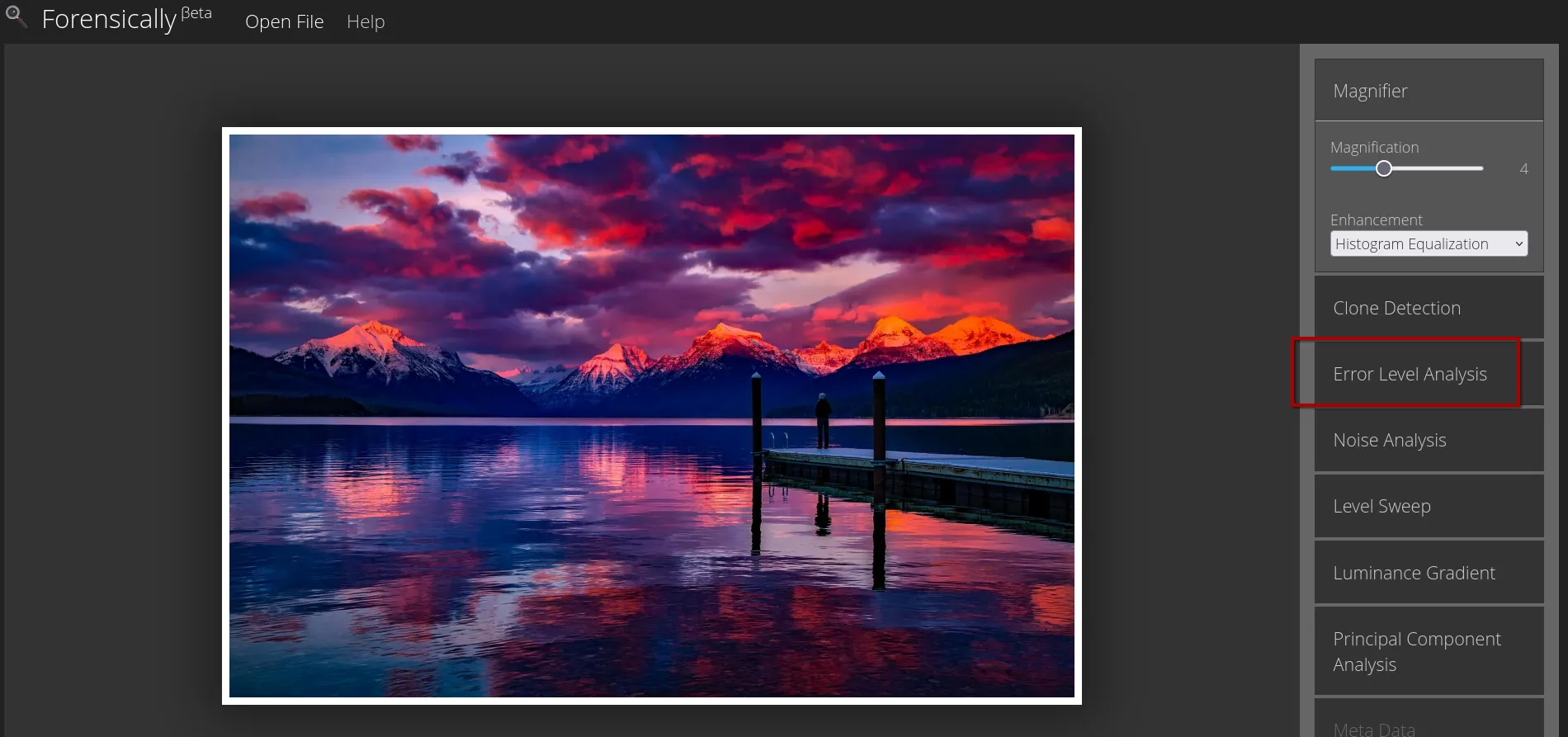
Error Level Analysis is the third tool in the list.
How ELA works. It re-saves the image as a JPEG at a chosen quality and shows the difference between the image and its re-saved copy, amplified. Areas that were already compressed at that quality barely change and stay dark. Areas with a different history (pasted, painted, edited after the last save) change more and light up.
The result:
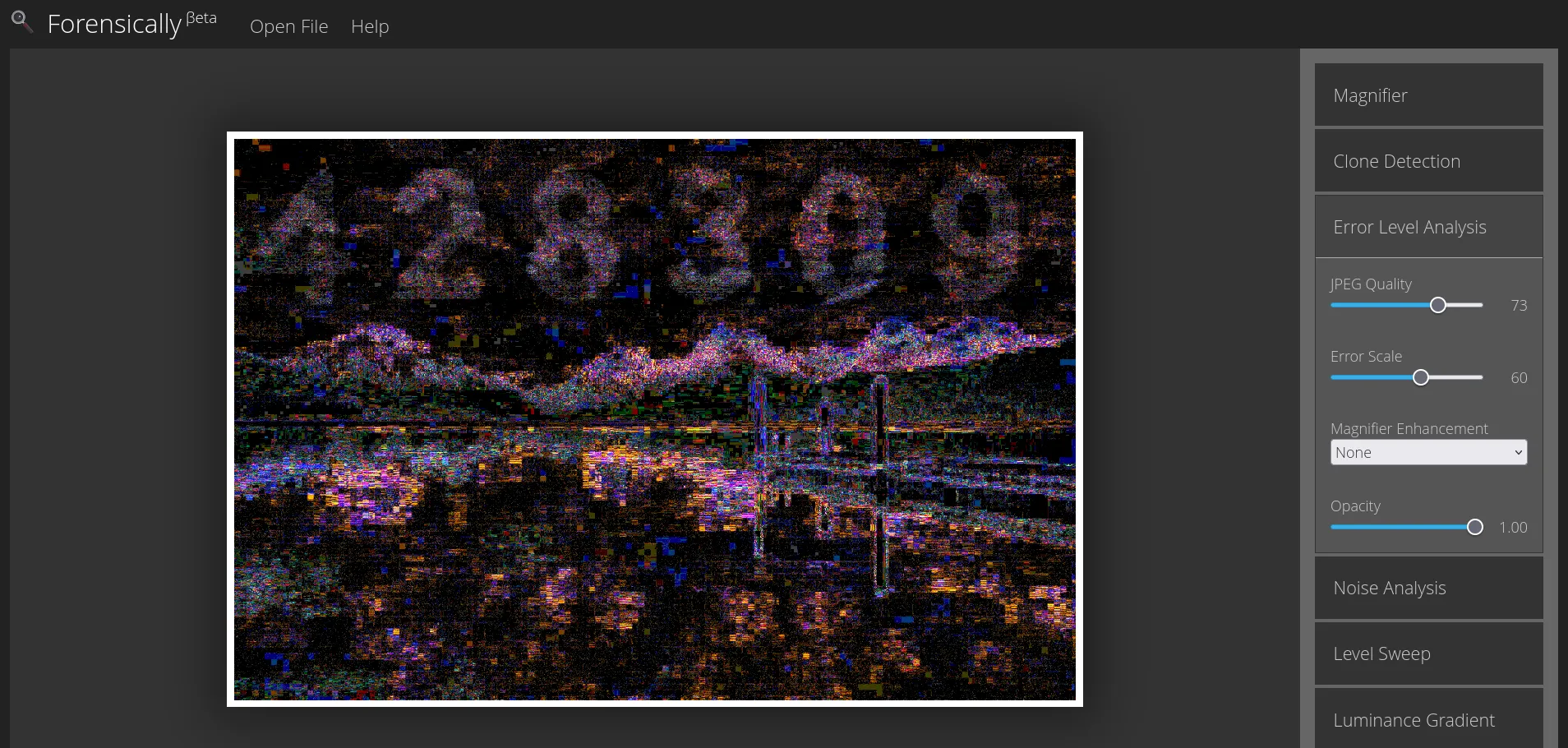
JPEG Quality 73, Error Scale 60. Across the clouds: 4 2 8 3 0 9.
Step 3: Why exactly quality 73
ELA isn’t a filter that “reveals edits” at any setting. Here the digits only show up in a narrow window around one quality value. I reproduced the analysis in Python, with Pillow doing the re-save, at three qualities:
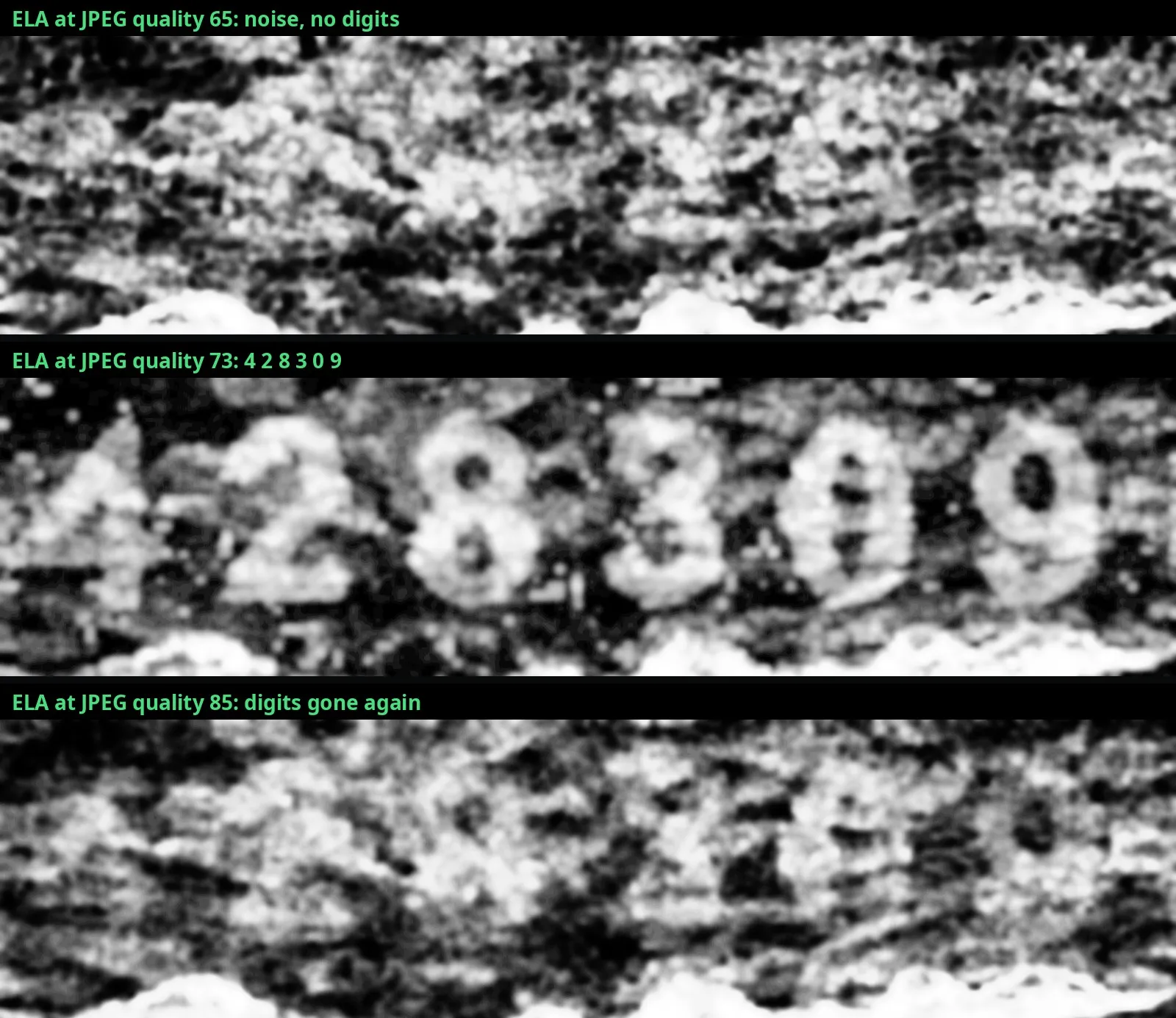
Below 73 and above it, the sky is uniform noise. At 73 the digits stand out.
The reason is in the numbers. Mean re-save error (sum over R, G, B) for pixels on the digit strokes versus the sky around them:
| Re-save quality | Digit strokes | Surrounding sky |
|---|---|---|
| 65 | 4.48 | 2.61 |
| 70 | 3.81 | 1.94 |
| 72 | 3.51 | 1.41 |
| 73 | 3.24 | 0.22 |
| 74 | 3.21 | 1.00 |
| 85 | 2.65 | 1.00 |
| 95 | 1.89 | 0.52 |
The sky’s error collapses almost to zero at exactly 73, and only there. That’s the signature of a JPEG ghost: an area that was saved at quality 73 reproduces itself nearly perfectly when it’s re-saved at 73. The digit areas have no such minimum, because they were changed after that save. So the sequence was: the photo was saved at quality 73, the digits were worked into the sky subtly enough that nobody can see them, and the result was saved again at 100.
How sure? The minimum is sharp (0.22 at 73, 1.41 at 72) and shows up in two independent implementations, Forensically’s in the browser and Pillow’s in Python. If the sky’s error had no minimum, ELA would show nothing at any setting, which is what you see at 65 and 85.
Verification
- Two independent tools. Forensically (browser JPEG encoder) and Pillow (libjpeg) produce the same six digits at the same quality.
- A physical explanation, not just a picture. The error table shows why the digits appear at 73 and nowhere else. A reading that only works on one tool’s output could be an artefact; a measurable ghost minimum is a property of the file.
- The reading itself. Side by side with the sky they’re hidden in:
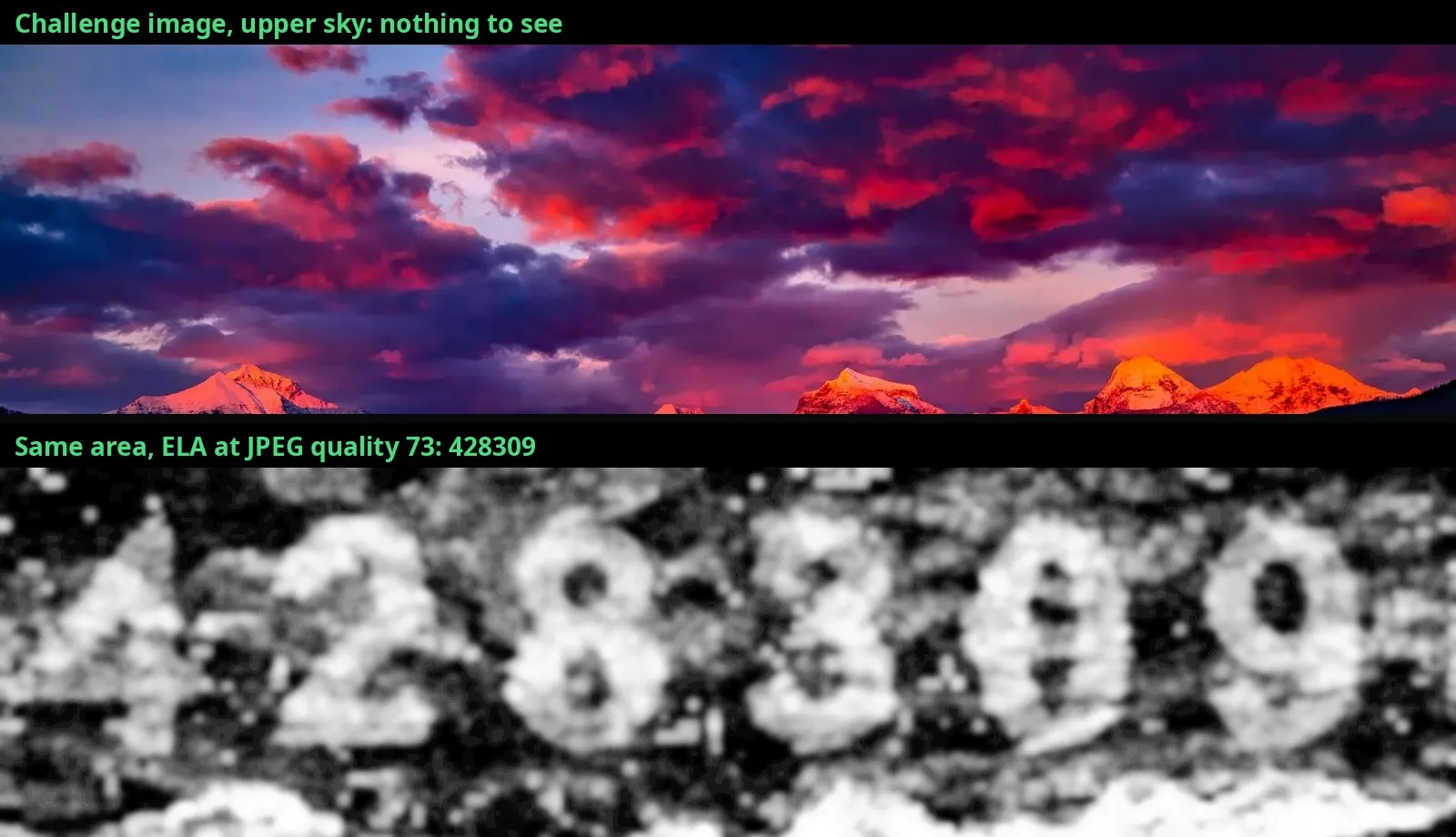
Top: the clouds as anyone sees them. Bottom: the same pixels in ELA at quality 73.
The alternatives, excluded. The ELA output is noisy, so I checked the digits that could be misread:
- Third digit, 8 not 3 or 6: two closed holes stacked on top of each other.
- Fourth digit, 3 not 8: open on the left, no closed holes.
- Fifth digit, 0 not 8: one tall hole, no waist in the middle. The speckles inside are noise, not a crossbar.
- Sixth digit, 9 not 0: a closed loop at the top with a tail running down on the right.
Answer
428309Takeaways
- Invisible doesn’t mean absent. An edit can be invisible to the eye and still leave a measurable trace in the file. “Hidden” in a brief about a manipulated JPEG points at compression, not at content.
- ELA is a sweep, not a single click. The setting that shows the edit is the one that matches the file’s earlier save. If ELA shows nothing, move the quality slider before concluding there’s nothing there.
- A final save at quality 100 preserves the evidence. It adds almost no error of its own, so the earlier compression history survives. Heavier re-compression would have blurred the ghost.
- On the brief’s question. A manipulated image is still evidence: of the manipulation. Treat ELA as a pointer to where and how something was changed, then confirm it with a second method, not as a verdict on its own.
Tooling
The Python check, verbatim. Pillow only, no forensics library:
from PIL import Image, ImageFilter, ImageOps
import io, numpy as np

im = Image.open("manipulated_lake.jpg").convert("RGB")
a = np.asarray(im, dtype=float)
print(Image.open("manipulated_lake.jpg").quantization)  # all 1s → saved at quality 100

for q in (65, 73, 85):
    buf = io.BytesIO()
    im.save(buf, "JPEG", quality=q)
    buf.seek(0)
    err = np.abs(a - np.asarray(Image.open(buf).convert("RGB"), dtype=float)).sum(2)
    g = Image.fromarray(np.clip(err * 10, 0, 255).astype("uint8"))
    g = ImageOps.equalize(g.filter(ImageFilter.GaussianBlur(6)).crop((0, 0, 2201, 560)))
    g.save(f"ela_q{q}.png")
The Gaussian blur and histogram equalisation only make the digits easier to read; the contrast is already in the raw error (see the table).
Sources
- Bellingcat Challenge 9: Clouded Perception
- Forensically by Jonas Wagner, Error Level Analysis
- Pillow, JPEG re-save for the independent check
- ExifTool, metadata check